
USER GUIDE | 11 min read
Table of contents
- What are stock photos?
- Why use stock photos?
- When to use stock photos on your website
- Types of stock photos perfect for business websites
- Stock photo licences that work for small business budgets
- The best places to get free stock photos
- Best paid royalty-free stock photo sources
- How to choose the right stock photos
- Choosing the right image sizes
- Reducing image file size for faster loading
- Basic stock photo editing
- Using stock photos legally
- Best practices for stock photo success
- When stock photos aren’t right for your website
- Key takeaways
You’re finally getting that professional website built for your business. Exciting, right? But now you need images that make your site look as polished as your services. Custom photography sounds amazing until you see the price tag – easily hundreds of dollars for a full shoot.
Here’s the good news: stock photos can give your new website that premium, professional look without the premium price. When chosen strategically, they’ll make your site appear trustworthy and established from day one. The key is knowing which ones to select, where to find quality options and how to use them legally.
What are stock photos?
Stock photos are professional images that multiple businesses can use. They’re generic enough to work across different industries – a handshake photo could suit a law firm, consulting company or real estate agency.
The main advantage? You get great-quality images for your website without the custom photography price tag.
Why use stock photos?
Budget friendly professional look
Custom photography sessions can cost S$150-S$500 per hour. Stock photos give you professional quality for free or a fraction of that cost.
Immediate availability
Need a hero image today? Stock photos are ready to download instantly. No scheduling photographers, waiting for edits or dealing with weather delays.
Variety & options
Stuck with one photographer’s style? Stock libraries offer millions of images across every industry, style and demographic you can imagine.
Consistent quality
Most stock platforms curate their content. You’re getting images that meet professional standards for composition, lighting and technical quality.
When to use stock photos on your website
Stock photos work perfectly for:
- Background or decorative images.
- Generic business concepts (meetings, handshakes, planning).
- Illustrating services without showing specific processes.
- Budget-conscious projects needing professional quality.

Types of stock photos perfect for business websites
Client-connection photos
These show interactions between people – meetings, consultations or friendly conversations. They build trust and show your business values relationships.
Best for: Service-based businesses, consultants, financial advisors, healthcare providers
What to look for: Genuine expressions, diverse representation, professional but approachable settings.

Service/action photos
Images that represent what you do – someone typing on a laptop, mechanic/technician in action or procedures being carried out. They help visitors understand your services immediately.
Best for: Any business where the process matters – contractors, agencies, repair services, fitness trainers
What to look for: Clear action, professional equipment, results-focused scenarios
Storefront/exterior photos
Generic business buildings, office interiors or commercial spaces that could represent your location without being your actual address.
Best for: Businesses where location atmosphere matters but you can’t photograph your actual space
What to look for: Similar architectural style to your area, appropriate lighting, professional appearance

Stock photo licences that work for small business budgets
Understanding licences protects you legally and saves money. Here’s what matters for your website.
Creative Commons Zero (CC0) licence – Your best friend
What it means: Complete freedom to use, modify and even sell these images without attribution.
Cost: Free
Perfect for: Any business use, including commercial websites
Where to find: Pexels, Unsplash, Pixabay
Other Creative Commons licences – Read the fine print
What it means: Free to use but may require attribution or have other restrictions.
Cost: Free, but check requirements
Perfect for: When you’re willing to credit the photographer
Where to find: Freepik
Royalty-free licences – Pay once, use forever
What it means: One payment gives you extensive usage rights (but not exclusive).
Cost: S$0.30-S$30 per image typically
Perfect for: When free options don’t meet your needs
Where to find: iStock, Shutterstock, Depositphotos
Take note: “Royalty-free” doesn’t mean free. It means no ongoing royalty payments after your initial purchase.

The best places to get free stock photos
1. Pexels – The gold standard
Why I recommend it first
- Massive selection of high-quality photos and videos.
- Everything is CC0 licensed – use freely without attribution.
- Images look natural, not overly “stock-photo-ish”.
- Great diversity in people, cultures and business scenarios.
- Collections feature lets you find cohesive image sets.
- Filter by orientation, people, age, size and colour.
- Download immediately without creating an account.
2. Unsplash – Another great choice
Why it’s my second pick
- Similar quality and CC0 licensing as Pexels.
- Includes illustrations alongside photos (no videos).
- Can only filter by orientation (fewer filter options than Pexels).
- Smaller selection overall but still substantial.
3. Pixabay – The one-stop shop
Why it makes the list
- Photos, videos, illustrations, vectors, music and sound effects all in one place.
- CC0 licensing across all content.
- Comprehensive filtering options.
- Good for businesses needing various media types.
- Large selection across categories, but quality not as high as Pexels and Unsplash.
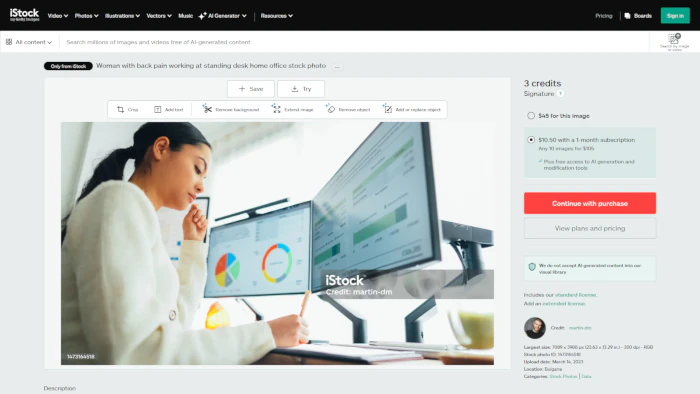
The best paid royalty-free stock photo sources
When free options don’t cut it, these paid platforms deliver premium quality.
iStock
Getty Images’ more affordable option with excellent quality control and extensive business-focused content.
Shutterstock
Industry leader with the largest selection and advanced search capabilities.
Depositphotos
Competitive pricing with flexible subscription options and good customer service.
Dreamstime
Budget friendly option with decent selection and frequent promotions.
Pro tip: Many paid platforms offer free images weekly or monthly. Sign up for their newsletters to access these freebies.
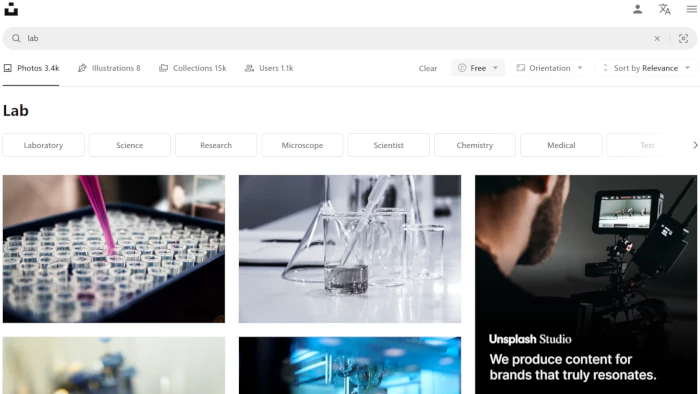
How to choose the right stock photos
Step 1: Define your photo needs
Before browsing, decide which type you need: client connection, service/action or storefront/exterior photos.
Step 2: Start with free CC0 sites
Begin your search on Pexels or Unsplash. You’ll be surprised how often you find exactly what you need for free.
Step 3: Use strategic keywords
Instead of searching “business”, try specific terms: “business meeting”, “Asian business executive”, “business document”.
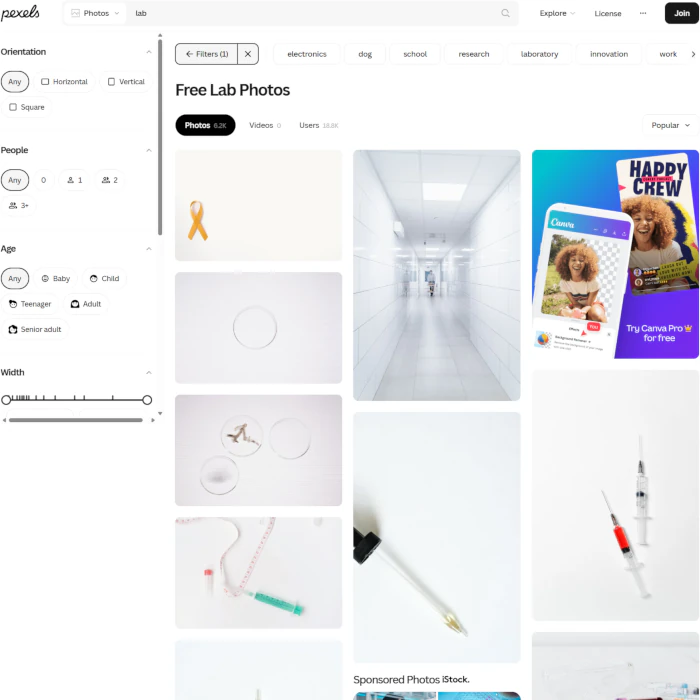
Step 4: Apply filters
Use filters to narrow down results and speed up your selection process:
Filter by orientation: Choose landscape, portrait or square based on where the image will appear.
Filter by colour: Streamline your search using your brand colours or neutral tones.
Step 5: Explore Collections
On Pexels and Unsplash, look for photographer Collections based on themes. This gives you multiple images with consistent lighting, style and colour palette.
Step 6: Expand to paid options if needed
If free sites don’t have what you need, then check royalty-free platforms. If you still can’t find suitable images, consider original photography or AI generation.

Choosing the right image sizes
Getting image sizes right prevents blurry photos and slow loading times. Here’s how to nail it
Know the website design template’s image aspect ratios
Most of my page layouts use standard ratios.
- 16:9 – Wide hero sections, rectangular images
- 4:3 – Standard oblong images
- 3:4 – Portrait orientation images
- 1:1 – Square images, team headshots
Match image width to usage
Full-width sections: Choose 1920px width or slightly larger
Half to three-quarter width: Choose 1280px width or slightly larger
Small sections or thumbnails: Choose 700px or slightly smaller
Planning to crop? Always choose larger dimensions so your final image maintains quality after cropping.
Consider mobile viewing
Most visitors view websites on phones. Test how your chosen images look on smaller screens before finalising your selection.
Reducing image file size for faster loading
Large image files slow down your website, frustrating visitors and hurting search rankings. Here’s how to optimise.
Resize before uploading
Don’t upload a 4000px image if you only need 1200px. Use free tools like:
- Adobe Express (online)
- Canva (online)
- GIMP (free software)
Compress without losing quality
Online Image Tool is my go-to compression tool. It reduces file sizes by 80-90% while maintaining visual quality. There’s also a separate tool to convert your image files to JPG, PNG or WebP.
Other good options:
Choose the right file format
WebP: Best choice for most photos – excellent compression with high quality.
JPG: Good for photos with lots of colours.
PNG: Good for images with transparency or graphics with text.
Basic stock photo editing
You don’t need Photoshop skills to make stock photos work better for your business.
Free online editing tools
Adobe Express and Canva offer powerful editing without software installation:
- Crop and resize
- Adjust brightness and contrast
- Remove backgrounds
- Add text overlays
- Apply filters
Apply basic composition rules
Before cropping, consider these 2 simple but immensely useful photography principles.
1. Rule of thirds
Place important elements along imaginary grid lines.
2. Negative space
Don’t crowd every inch – empty space helps focus attention.
Maintain consistent look
Edit multiple images similarly to create a cohesive look across your website. Match brightness, contrast and colour temperature.
Using stock photos legally
Legal issues can cost thousands. Here’s how to stay safe
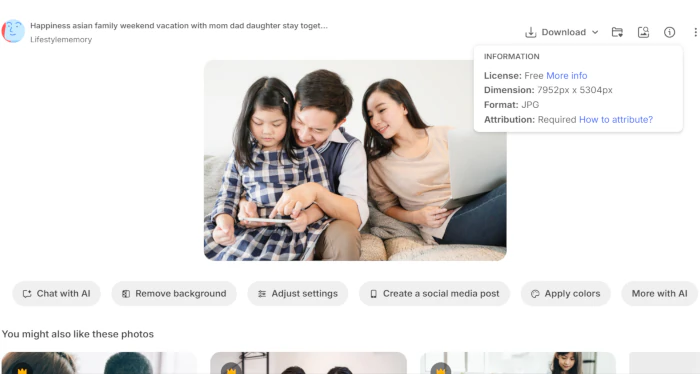
Always check the licence
Even on free sites, individual images might have different restrictions. Look for the licence information before downloading.
Keep download records
Save proof of where you got each image and what licence it had. This protects you if questions arise later.
Understand attribution requirements
Some Creative Commons licences require crediting the photographer. If required, add credits in your website footer or image captions.
Don’t redistribute
Most licences allow you to use images on your website but not to resell them or offer them for download to others.
When in doubt, ask
If you’re unsure about usage rights, contact the platform or photographer directly. It’s better to clarify than face legal issues later.

Best practices for stock photo success
Choose strategically
Match images to your brand personality and audience. A playful children’s store needs different photos than a law firm. Select images representing the people you actually serve – if your customers are diverse, your photos should be too.
Maintain consistency
Use similar lighting, colour palettes and styles across your website. Avoid mixing professional corporate shots with casual lifestyle photos – it creates visual chaos.
Prioritise authenticity
Choose natural-looking, unposed images when possible. Skip the obvious stock photos like that generic businesswoman pointing at graphs – everyone’s seen her.
Test & optimise
Preview images on phones, tablets and computers before finalising. Images with text that look great on desktop might be unreadable on mobile devices.
Keep it fresh
Update your stock photos periodically to maintain a current, engaging appearance. Choose substance over style – a beautiful image that doesn’t represent your business confuses more than it helps.
When stock photos aren’t right for your website
While stock photos are versatile, some situations call for original photography:
- Team and staff photos – Customers want to see the real people they’ll work with.
- Your actual products or services – Nothing beats showcasing what you actually offer.
- Location-specific content – Your storefront, office space or local landmarks need authentic representation.
- Highly specialised or technical work processes – Generic photos can’t capture your unique expertise.
For these scenarios, original photos build stronger trust and authenticity. Need help taking professional photos yourself? Check out our DIY website photography guide for tips on creating quality images with basic equipment.
Key takeaways
- CC0 licensing gives you complete freedom. Use, modify and publish images without attribution requirements or legal worries.
- Start free, upgrade only when needed. Pexels and Unsplash provide professional quality before considering paid options.
- Generic photo types work better. Focus on universal concepts like meetings, people interactions and professional environments rather than business-specific imagery.
- Proper sizing prevents slow loading. Choose correct dimensions and compress files to maintain quality while ensuring fast page speeds.
Let’s turn your website goals into reality
Want a website that’s professional but doesn’t break the bank? I help Singapore SMEs get online with sites that look great and convert visitors into customers. Let’s talk.
Click/tap the WhatsApp button on the right and type away!
The other way:
Request callback by filling in the form below.