
USER GUIDE | 5 min read
Table of contents
- 4-step workflow that creates professional website copy
- Step 1: Complete your Business Profile form thoroughly
- Step 2: Create your prompt using the template
- Step 3: Choose your AI platform
- Step 4: Generate & refine your website copy
- Why this template system works so well
- Getting started on your website copy
- Key takeaways
Getting quality website copy used to mean hiring expensive copywriters or spending countless hours crafting content yourself. Now, AI can write professional copy for your business – but only if you know how to ask for it properly.
The difference between amateur and professional AI-generated copy lies in the prompt. Generic prompts give you generic results. Specific, well-structured prompts give you copy that sounds like it’s written specifically for your business.
That’s where my prompt template comes in. I’ve spent weeks perfecting this system to help clients get agency-quality website copy without the agency price tag. This guide shows you exactly how to use it, step by step.
4-step workflow that creates professional website copy
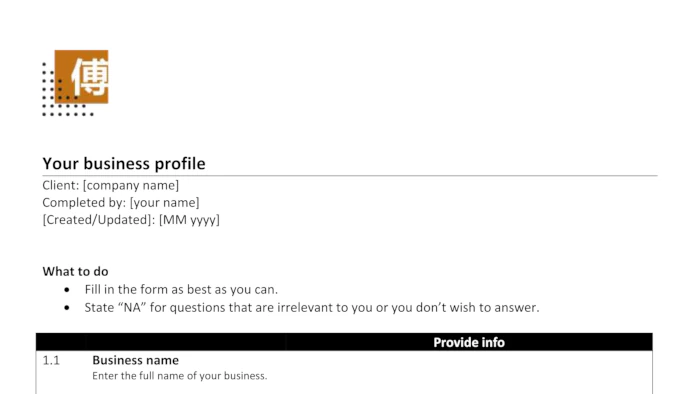
Step 1: Complete your business profile form thoroughly
Everything starts with the Business Profile form I provide. Think of this as the foundation of your entire website copy project.
The form captures essential details about your business – from basic information like your company name and address to strategic elements like your competitive advantages and target customers.
This isn’t busy work – every piece of information you provide will directly improve the quality of your final copy.
What makes this step crucial: Your business is unique, and your website copy should reflect that. The more specific details you provide about your company’s story, values and services, the more personalised and compelling your AI-generated copy will be.
Take time to fill in every relevant section. If a question doesn’t apply to your business, simply write “NA (Not Applicable)” and move on. But for sections that do apply, be thorough – this is where the magic happens.
Step 2: Create your prompt using the template
Now comes the exciting part – transforming your business information into a powerful AI prompt using my template.
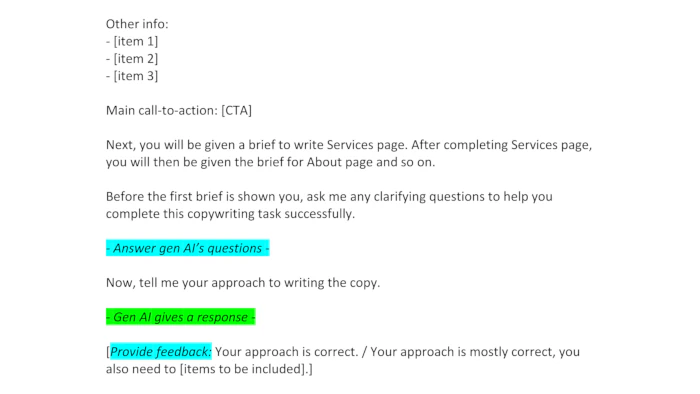
Understanding the template structure
- Text in square brackets [] = Information you need to fill in from your Business Profile form
- Blue highlighted text = Actions you need to take
- Green highlighted text = What the AI will do in response
- Yellow highlighted text = Specific scenarios or conditions
The template is designed as a conversation with the AI. You’ll start by providing all your business context, then move through 3 separate briefs – one each for your Services page, About page and Home page.
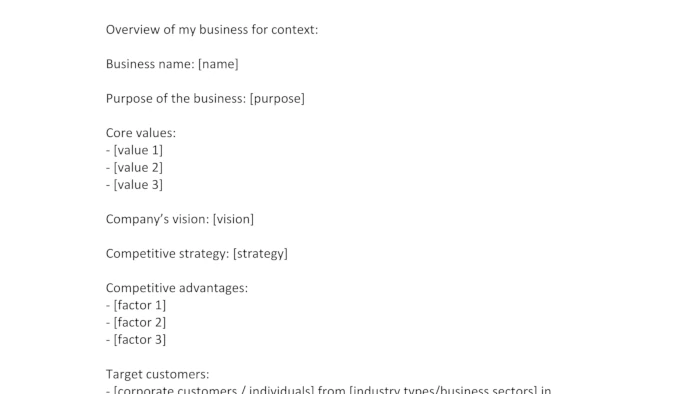
How to fill in the template
- Replace every bracketed placeholder with information from your Business Profile form.
- Copy relevant details like your competitive advantages, target customers and service descriptions.
- Specify your main call-to-action (usually something like “Contact us for a quote” or “Schedule a consultation”).
- Choose your tone of voice from the appendix – I recommend “Professional” or “Conversational” for most Singapore SMEs.
Step 3: Choose your AI platform
The template works well across all major AI platforms. You have several good options.
Free platforms
- ChatGPT (free version)
- Claude AI
- Microsoft Copilot
- Google Gemini
Paid platforms
- ChatGPT Plus
- Claude Pro
The free versions work perfectly fine for this template. Create a free account and log in before starting – this saves your conversations so you can work on your project across multiple sessions without losing progress.
Step 4: Generate & refine your website copy
This is where your preparation pays off. The template guides both you and the AI through a structured conversation that produces professional copy for each page.
Conversation flow
- Start by pasting the entire template (with your filled-in info) into the AI.
- The AI will ask clarifying questions. Answer them based on your business knowledge.
- The AI will then outline its approach; review and approve it.
- Generate your Services page first, go through the output, and request any necessary changes.
- Move on to your About page, then your Home page.
- Each page includes the copy plus SEO elements, such as meta titles and descriptions.

Review process
After each page is generated, read through the copy carefully. Look for any information that doesn’t correctly represent your business. If you spot errors or want changes, simply highlight the specific parts and ask the AI to revise them.
This iterative approach ensures your final copy is both professionally written and completely accurate to your business.
Why this template system works so well
Most people struggle with AI copywriting because they don’t provide enough context or structure. They ask for “website copy” and wonder why the results sound like everyone else’s website.
My template solves this by giving AI everything it needs: detailed business information, clear writing guidelines, specific formatting requirements and a structured process to follow. It’s like having a comprehensive brief that any professional copywriter would need to create quality work.
The interactive approach also makes a huge difference. Instead of generating everything at once, the template creates a conversation that allows for clarification and refinement. This mirrors how professional copywriters actually work – they ask questions, present drafts and refine based on feedback.
Getting started on your website copy
You now have everything needed to create professional copy for your website. The template removes the guesswork from AI prompting, while your Business Profile form ensures the content reflects your unique value proposition.
Remember, the quality of your output directly relates to the quality of your input. Take time with your Business Profile form, be specific about your business details and don’t rush through the template setup.
Your website visitors will notice the difference between generic copy and content that speaks directly to their needs. This system delivers exactly that, at a tiny fraction of traditional copywriting costs!
Once you’ve mastered website copy, you might want to explore creating other types of content for your business. I’ve also developed a similar template system for generating engaging web content, like blog posts and articles, using AI prompts.
Key takeaways
- Quality AI prompts are the difference between generic copy and content that sounds uniquely yours – my template provides the structure you need.
- The Business Profile form captures your unique business story, giving AI the specific context required for compelling, personalised copy.
- My proven 4-step process transforms scattered business details into professional Services, About, and Home pages optimised for search engines.
- You don’t need copywriting skills or AI expertise – just follow the color-coded template system and interactive conversation approach.
- This method delivers agency-quality website copy at hardly any cost, with prompts that work on all major AI platforms.
Let’s turn your website goals into reality
Want a website that’s professional but doesn’t break the bank? I help Singapore SMEs get online with sites that look great and convert visitors into customers. Let’s talk.
Click/tap the WhatsApp button on the right and type away!
The other way:
Request callback by filling in the form below.